
How to troubleshoot problems
Checking the Java version
You can tell which Java version ImageJ is using by clicking the ImageJ status bar and looking for the part that says e.g. “Java 1.8.0_45 [64-bit]”. The relevant number is the one after “Java 1.”—so e.g. “Java 1.8.0_45” or similar indicates Java 8, while “Java 1.7.0_79” or similar indicates Java 7.
On macOS, you can use this script to diagnose which versions of Java are installed on your system.
See also How do I launch ImageJ with a different version of Java?.
Launching ImageJ from the console
To diagnose problems with ImageJ, it is often helpful to launch it in debug mode:
 On Linux 64-bit (from a console):
DEBUG=1 $HOME/ImageJ2.app/ImageJ-linux64
On Linux 64-bit (from a console):
DEBUG=1 $HOME/ImageJ2.app/ImageJ-linux64 On macOS (from Terminal):
DEBUG=1 /Applications/ImageJ2.app/Contents/MacOS/ImageJ-macosx
On macOS (from Terminal):
DEBUG=1 /Applications/ImageJ2.app/Contents/MacOS/ImageJ-macosx On Windows 64-bit:
- Make a copy of
ImageJ-win64.execalleddebug.exe - Run
debug.exe
- Make a copy of
If you need more control
You can control the log level more precisely by setting the scijava.log.level system property. E.g., on Linux:
$HOME/ImageJ2.app/ImageJ-linux64 -Dscijava.log.level=trace --
Valid levels include: none, error, warn, info, debug and trace. See the Logging page for more about SciJava logging.
The other debug mode
There is another debug mode, which can be enabled in the Edit › Options › Misc… menu, by checking Debug mode. This might reveal different information than using the techniques described above. For maximum debugitude, turn on both!
If ImageJ freezes or hangs
If ImageJ appears to hang—i.e., it stops responding to inputs—it is often helpful to take a “snapshot” of where the program is at after the hang occurs. This information can give the developers valuable hints about how to fix the problem.
There are two ways to create such a snapshot, known as a “thread dump” or “stack trace”.
The easy way
- Press ⇧ Shift + \ in ImageJ itself. If successful, it will open a new window with the stack trace.
- Press ⌃ Ctrl + A to select it, then ⌃ Ctrl + C to copy it to the clipboard.
The fallback way
If the first method does not work, and you can reproduce the hang:
- Launch ImageJ again, this time from the console as described above.
- On Windows, you will need to download and run this batch file, which launches ImageJ with an attached Command Prompt window.
- Generate and copy the stack trace:
- On non-Windows platforms:
- Press ⌃ Ctrl + \ in the console window to print the stack trace.
- Select the stack trace by dragging with the left mouse button.
- Right click and select “Copy” to copy it to the clipboard.
- On Windows:
- Press ⌃ Ctrl + Pause in the Command Prompt window to print the stack trace. (Note: this shortcut actually uses the Break key)
- Click the Command Prompt icon in the upper left corner of the window, and choose Edit › Mark.
- Select the stack trace by dragging with the left mouse button.
- Press ↵ Enter to copy it to the clipboard.
Once you have the stack trace. you can paste it into a bug report!
If ImageJ crashes
If ImageJ crashes—i.e., the program suddenly terminates, with or without an error message—it is very helpful to identify the steps which can reliably reproduce the crash:
- Launch ImageJ from the console as described above.
- Perform the same actions which previously resulted in the crash.
- Take note of any error messages in the console window, which you can copy and paste it into a bug report.
If ImageJ does not start up
On a fresh installation
On some 32-bit Windows systems, ImageJ may initially request more memory than Windows can handle. If you launch ImageJ in debug mode (see above), and receive a message like:
Could not reserve enough space for 1253376KB object heap
Then you can try the following:
- Run Notepad
- Paste in the following: . jre\bin\javaw.exe -Xmx512m -cp ij.jar ij.ImageJ
- Save the file as
ImageJ.cfgin yourImageJ2.app(orFiji.app) installation.- Note that by default, Windows hides file extensions; you may need to show file extensions before you can successfully name the file
ImageJ.cfgas required.
- Note that by default, Windows hides file extensions; you may need to show file extensions before you can successfully name the file
- Try running
ImageJ-win32.exeagain.
You can replace the 512m with however many megabytes of memory you wish to give to ImageJ.
After running the updater
If the ImageJ window never appears after launching the program, the installation may be corrupted. While the developers of ImageJ make a serious effort to prevent this problem from happening, it is still possible after running the Help › Update… command, due to bugs in the Updater.
The easiest workaround is to download a fresh copy of the software.
If you are feeling investigative, you can try launching ImageJ from the console to get more information about why it is failing to start up. After doing that, you will probably see some information printed to the console, which you can paste online to somewhere like Pastebin.com, and write to the Community to ask for help deciphering it.
Advanced debugging techniques
If you are technically savvy, check out the Debugging page for additional—but more complicated—debugging techniques.
Common issues
The image I loaded is displayed all black! But it is not black!
This problem can arise when 12-bit, 14-bit or 16-bit images are loaded into ImageJ without autoscaling. In that case, the display is scaled to the full 16-bit range (0 - 65535 intensity values), even though the actual data values typically span a much smaller range. For example, on a 12-bit camera, the largest possible intensity value is 4095—but with 0 mapped to black and 65535 mapped to white, 4095 ends up (linearly) mapped to a very very dark gray, nearly invisible to the human eye.
You can fix this by clicking on Image › Adjust › Brightness/Contrast… and hitting the Auto button.
You can verify whether the actual data is there by moving the mouse over the image, and looking at the pixel probe output in the status bar area of the main ImageJ window.
The image colors do not match what I see in other programs! ImageJ is wrong!
In many cases, ImageJ performs autoscaling by default, to improve the contrast of your image. Otherwise, in many cases with scientific images you might see only a black square (see previous question).
You can override the autoscaling using the Brightness/Contrast dialog.
It is important to understand that your image is a collection of samples, each of which has a numerical intensity value. The unit of these values is rather arbitrary and unspecified, depending on the type and calibration of your detector. Your file is stored with a certain bit depth, meaning these intensities can range from 0 (no light detected) to a particular maximum value (the most light the detector is capable of detecting). For example, 8-bit images have a maximum value of 255, whereas 16-bit images have a maximum of 65535. In practice though, especially with higher bit depths, your detector will not typically record sample intensities across that entire range of values (and if it does record a significant number of values at the maximum, you probably oversaturated your detector, which will skew your analysis!).
Because the full range of values is typically much less than the maximum—e.g., in the case of a 12-bit detector the actual maximum range is 0-4095, and often even smaller in practice—ImageJ performs autoscaling to show you a meaningful or “pretty good” image by default, which is not just a black square (see previous question). That is: it maps the darkest actual intensity in your data to black, and the brightest actual intensity in your data to white. You can override this mapping using the Brightness/Contrast dialog under the Image › Adjust menu (shortcut: ⇧ Shift + C).
Alternately, to disable autoscaling during initial import, you can use the Bio-Formats plugin to import your data with the “Autoscale” option turned off:
- File › Import › Bio-Formats
- Choose your file
- Uncheck the “Autoscale” box
- Click OK
- The data will be scaled to match the maximum of the bit depth, rather than autoscaled.
Further reading:
Whenever I open a file in ImageJ, the file size increases by a ridiculous amount!
Are you using a compressed format such as JPEG, PNG or ZIP? The file size on disk is smaller than the size of the pixels in memory. ImageJ reports this true (uncompressed) size of the image in the subtitle bar of the image window. For example: an uncompressed image of 16000 pixels x 16000 pixels x 32 bit (RGBA) will occupy 976 MB in memory.
Note that lossy compression is not suitable for quantitative image analysis.
The same plugin gives different results on different machines!
While ImageJ strives for reproducible analysis, there are many reasons results can differ. Check the following:
- Ensure that the version of ImageJ is exactly the same on both machines.
- Click the status bar and you will see something like “ImageJ 2.0.0-rc-26/1.49p”.
- If these two values differ between your machines, the versions are not the same.
- See also How can I verify that my ImageJ is really 100% up to date?.
- If the two versions of ImageJ match but produce different numerical results, it is a bug—please report it!
- Ensure that the options of ImageJ match between the machines.
- A fast way to ensure this is the Edit › Options › Reset… command, which resets everything to its default state.
- Alternately, you can check the settings in the following dialog boxes:
- All Edit › Options dialog boxes
- Process › Binary › Options… – a very common culprit of black-vs.-white issues is the “Black background” option.
- Process › FFT › FFT Options…
- Image › Overlay › Overlay Options…
- Analyze › Gels › Gel Analyzer Options…
- Press ⌃ Ctrl / ⌘ ⌃ Ctrl on a PC ⌘ command on a Mac + L for the search bar and type “options” and double check any other options you think might be relevant.
- If you are running your analysis headless, there might be a bug in the headless support.
- Try the analysis headless on both machines and see if the results match.
- Try the analysis headless vs. through the GUI on a single machine, and see if the results match.
- If the results differ due to headlessness, it is a bug—please report it!
Common error messages
OutOfMemoryError
The error means ImageJ ran out of available computer memory (not hard drive space).
The first thing to do is make sure that ImageJ has a large enough “maximum heap” size:
- Edit › Options › Memory & Threads
- Change “Maximum Memory” to something larger (at most, 1000 MB less than your computer’s total RAM).
- Restart ImageJ for the new memory settings to take effect.
Note that in most cases, the ImageJ launcher will make an initial guess at a reasonable value: ~75% of physical RAM.
You can confirm how much memory is actually available by clicking on the status bar. You will see a “[used] of [max]” memory message, as pictured here:
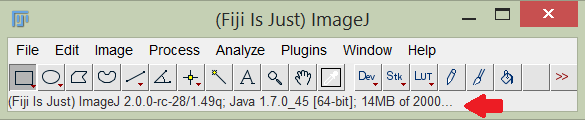
If you are already at the limits of your computer’s physical memory, the next step would be to add more.
If setting this value somehow has no effect: Check for an environment variable called _JAVA_OPTIONS or similar, which is overriding the value. If the variable exists, change the memory value there, or remove the variable completely.
About Java garbage collection: Java always automatically calls the garbage collector when the heap is getting full [1]. While it is possible to manually invoke the garbage collector by clicking ImageJ’s status bar—or programmatically by calling run("Collect Garbage") in a macro or System.gc() in a plugin—it will not solve the fundamental problem of Java actually not having a sufficient amount of memory. (The only exception to this is a rare case where Java decides that garbage collection is happening too slowly, in which case you should see the message “GC overhead limit exceeded” [2]).
NegativeArraySizeException
This error usually means that your image planes are larger than the maximum supported size.
The original ImageJ only supports image planes with 2 gigapixels (2^31 = 2147483648 pixels; in case of a square image, the maximum allowed is 46340 x 46340 pixels) or less. If your data has extremely large image planes—e.g., 50000 x 50000 pixels—you may need to analyze region by region. One way to do this is using the “Crop on import” feature of the Bio-Formats plugin.
If you are using Bio-Formats to open a file, however, the size limit is a bit more complicated. Instead of using short[] as in ImageJ, Bio-Formats store data in byte[] when reading planes. If the source image is in 16 bit or in 32 bit (4 bytes, eg. floating point TIFF), the maximum pixel numbers allowed per plane will be 1/2 (1 gigapixels) or 1/4 (0.5 gigapixels), respectively.
ImageJ2 supports larger image planes internally, but uses the original ImageJ user interface by default, which once again limits visualization to 2 gigapixels. The ImageJ2 team is working to lift these size restrictions; see imagej/imagej#87.
UnsupportedClassVersionError
Usually, this error takes the form of “Unsupported major.minor version 52.0” or similar, and indicates you are attempting to use a plugin which requires a newer version of Java than you are running. For example, you may have enabled an update site that requires Java 7, but your ImageJ is using Java 6.
Check which version of Java is being used by ImageJ; see Checking the Java version above.
The number given in the UnsupportedClassVersionError error messages is an internal code, which translates to Java versions as follows:
| Internal code | Java version |
|---|---|
| 45.0 | JDK 1.1 |
| 46.0 | J2SE 1.2 |
| 47.0 | J2SE 1.3 |
| 48.0 | J2SE 1.4 |
| 49.0 | J2SE 5.0 |
| 50.0 | Java SE 6 |
| 51.0 | Java SE 7 |
| 52.0 | Java SE 8 |
See Java version history for more information about these different versions.
To control the version of Java that ImageJ uses, see How do I launch ImageJ with a different version of Java.
NoSuchMethodError or NoClassDefFoundError
These errors indicate a “version skew” between the software libraries in your ImageJ installation. Most commonly, this situation occurs when multiple update sites are enabled which ship incompatible versions of those libraries.
The proper fix is for the maintainers of those update sites to reconcile the versions somehow, but as a user you can work around the issue in the meantime by disabling the problematic update site(s). Start from a fresh download of ImageJ, enabling the update sites you want one by one, testing your workflow each time. Once you determine which update site(s) causes the issue, you can create a separate copy of ImageJ with only the problematic site(s) enabled. Although you will no longer have a single ImageJ with all desired functionality enabled, keeping isolated installations will let you continue using all the plugins you need by launching each appropriate copy of ImageJ.
VerifyError
Certain versions and builds of the original ImageJ library (ij.jar) within an ImageJ2 installation may result in fatal VerifyError messages to the console upon startup.
For example, if you compile the original ImageJ with OpenJDK 8 and insert the resulting ij.jar into Fiji.app/jars, it may fail with java.lang.VerifyError: Expecting a stack map frame. This is a known documented issue with ij1-patcher.
To work around this issue before a proper fix is available, you can disable bytecode verification:
$HOME/ImageJ2.app/ImageJ-linux64 -Xverify:none --
(Replacing ImageJ-linux64 with the launcher for your particular platform, of course.)
There may still be problems with the ImageJ Legacy layer in this scenario, but it does allow the program to start up successfully.
macOS issues
Why does ImageJ run so slowly?
Java painting bug
See the MacOS page.
App Nap
See the MacOS page.