|
Bugzilla – Bug 1180 |
Inconsistent x,y, and z shift with bilinear/bicubic interpolation |
Last modified: 2015-10-27 19:30:43 CDT |
| ⚠ |
NOTICE! This is a static HTML version of a legacy Fiji BugZilla bug. The Fiji project now uses GitHub Issues for issue tracking. Please file all new issues there. |
| Inconsistent x,y, and z shift with bilinear/bicubic interpolation | |
|
|
|
||||||||||||||||||||||||||||||||||||||||||
|
|
||||||||||||||||||||||||||||||||||||||||||||
|
|||||||

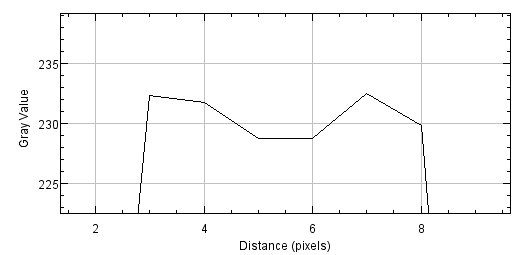
Consider the macro pasted below. When running 'Image > Adjust > Size...' with bilinear or bicubic interpolation, the position of pixels gets shifted by 1.0 pixel in X, by 0.5 pixel in Y, and by 0.5 pixel in Z direction, when compared to scaling without interpolation. With the macro below, I get the following values for the center of mass: 1 None:6 8 8 8 8 2 Bilinear:6 8 8 9 8.500 3 Bicubic:6 8 8 9 8.500 I would expect all values to be 8 in the above table. In addition, I see a shift in Z when scrolling through the three stacks side by side. // macro code to illustrate scaling issue newImage("Original", "8-bit black", 8, 8, 8); setForegroundColor(255, 255, 255); run("Specify...", "width=4 height=4 x=2 y=2 slice=3"); setSlice(3); run("Fill", "slice"); setSlice(4); run("Fill", "slice"); setSlice(5); run("Fill", "slice"); setSlice(6); run("Fill", "slice"); run("Select None"); run("Set... ", "zoom=1600 x=4 y=4"); run("Set Measurements...", "centroid center display redirect=None decimal=3"); run("Duplicate...", "title=None duplicate"); run("Size...", "width=16 height=16 depth=16 interpolation=None"); setSlice(6); run("Set... ", "zoom=800 x=4 y=4"); run("Measure"); selectImage("Original"); run("Duplicate...", "title=Bilinear duplicate"); run("Size...", "width=16 height=16 depth=16 interpolation=Bilinear"); setSlice(6); run("Set... ", "zoom=800 x=4 y=4"); run("Measure"); selectImage("Original"); run("Duplicate...", "title=Bicubic duplicate"); run("Size...", "width=16 height=16 depth=16 interpolation=Bicubic"); setSlice(6); run("Set... ", "zoom=800 x=4 y=4"); run("Measure"); Information about your version of Java: os.arch => amd64 os.name => Windows 7 os.version => 6.1 java.version => 1.6.0_24 java.vendor => Sun Microsystems Inc. java.runtime.name => Java(TM) SE Runtime Environment java.runtime.version => 1.6.0_24-b07 java.vm.name => Java HotSpot(TM) 64-Bit Server VM java.vm.version => 19.1-b02 java.vm.vendor => Sun Microsystems Inc. java.vm.info => mixed mode java.awt.graphicsenv => sun.awt.Win32GraphicsEnvironment java.specification.name => Java Platform API Specification java.specification.version => 1.6 sun.cpu.endian => little sun.desktop => windows file.separator => \ The up-to-date check says: REMIND_LATER Information relevant to JAVA_HOME related problems: JAVA_HOME is set to: C:\UTILIT~1\FIJI-D~1.APP/java/win64/jdk1.6.0_24//jre imagej.dir => C:\UTILIT~1\FIJI-D~1.APP Information about the version of each plugin: Activated update sites: ImageJ: http://update.imagej.net/ (last check:20151017033411) Fiji: http://update.fiji.sc/ (last check:20151026112036)Created attachment 271 Result of upscaling with bilinear interpolation (1.50e1) Thanks Wayne, it's much better now. What still puzzles me is the asymmetry in the x direction (both with bilinear and bicubic interpolation), while y and z look good now. Switching to the Fire LUT illustrates the issue in this (admittedly artificial) situation, see attachment.Created attachment 272 Magnified region of a profile plot of upscaled image along x