|
Bugzilla – Bug 835 |
Fiji hangs when installing macro tool |
Last modified: 2014-08-31 00:45:12 CDT |
| ⚠ |
NOTICE! This is a static HTML version of a legacy Fiji BugZilla bug. The Fiji project now uses GitHub Issues for issue tracking. Please file all new issues there. |
|
|
|
||||||||||||||||||||||||||||||||||||||||||
|
|
||||||||||||||||||||||||||||||||||||||||||||
|
|||||||||
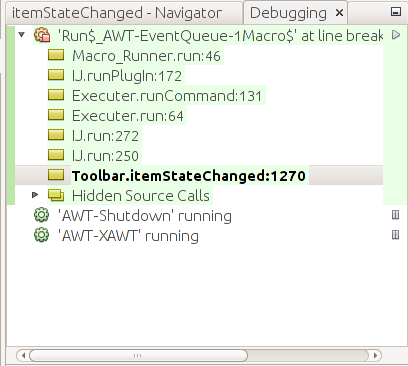
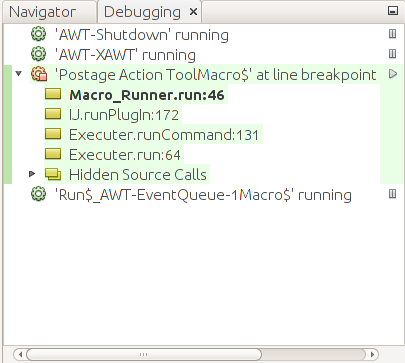
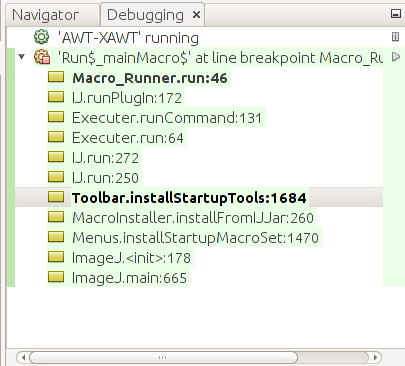
1) Make a macro tool like macro "Postage Action Tool - R0063R0663R0c63Ra063Ra663Rac63" { print("Tile"); } 2) Call the file "Postage_Action_Tool.ijm". 3) Place this file in Fiji.app/plugins/Tools 4) Start Fiji and press ">>" on the tool bar and choose "Postage Action Tool". Fiji will hang and not accept any input from the menu or from the keyboard. I wanted to make a thread dump by using ctrl+\ but the keyboard had no response. I am using a Linux 32 bit machine but I don't believe it is OS dependent. I had a discussion with Wayne Rasband on the problem in Bug 821. The same macro in Fiji.app/macros/toolsets will install properly and run. The problem with this directory is the installation is forgotten on the next startup. In any case this bug is about the system hanging. Thanks, IlanCreated attachment 181 install from moreCreated attachment 182 install from plugin toolsCreated attachment 183 startupMy debugging environment is NetBeans and I use ImageJ, not Fiji for memory considerations. For example there have been cases where a large whole body scan would not fit into memory for debugging. With this restriction, I was able to find out what goes on inside ImageJ when I install a macro tool. I can verify that ImageJ works properly but Fiji fails. I would like to be able to work with someone who can check the Fiji environment. I will describe what happens in 3 different cases: 1) installing using the toolbar "More" command and choosing the macro. 2) installing using Plugins -> Tools and choosing the macro. 3) restarting ImageJ where the tools are reinstalled from the registry values. In Fiji case 1 causes a crash which freezes the keyboard. Fiji case 2 causes the macro to run but it doesn't get installed to the toolbar. Case 3 cannot be checked in Fiji since installation of the tool always fails. In the case of both a plugin jar file as well as a macro, both receive the run command. The plugin jar is simpler since its run does the install. The macro runs through some 6 different run commands. The stack dumps are shown in the 3 attachments. The crucial point is the macro name. Here is the code in macro runner which does the job else if (name.endsWith("Tool.ijm") || name.endsWith("Tool.txt") || name.endsWith("Menu.ijm") || name.endsWith("Menu.txt")) (new MacroInstaller()).installTool(Menus.getPlugInsPath()+name); My tool is called Postage_Action_Tool.ijm and the Tool.ijm is the key. In ImageJ all works correctly so that it reaches this point. In case 2 of Fiji, it won't reach this point - instead of installing the tool, it runs it. In case 1 Fiji just crashes. Now to consider the different cases. In case 1 the interesting things start at String label = item.getLabel(); String cmd = item.getActionCommand(); boolean isTool = cmd.equals("Tool") || cmd.equals("Plugin Tool"); if (!(label.equals("Help...")||label.equals("Remove Custom Tools")) && !isTool) currentSet = label; if (isTool) { if (cmd.equals("Tool")) // built in tool installBuiltinTool(label); else // plugin or macro tool in ImageJ/plugins/Tools IJ.run(label); return; in itemStateChanged. The cmd is "Plugin Tool" and not "Tool" so that it skips the installBuiltinTool and does the IJ.run(label). In Fiji is it Tool, or Plugin Tool? Case 2 does a run directly which in ImageJ ends up checking the file name and causing the install, whereas in Fiji it just runs with no install. Why does Fiji act differently? Case 3 is the startup which works in ImageJ and can't be reached in Fiji. The code is public void installStartupTools() { if (IJ.debugMode) IJ.log("Toolbar.installStartupTools"); for (int i=0; i<=6; i++) { String name = Prefs.get(TOOL_KEY + (i/10)%10 + i%10, ""); if (IJ.debugMode) IJ.log(" "+i+" "+name); if (name.equals("")) continue; installingStartupTool = true; boolean ok = installBuiltinTool(name); if (!ok) { if (name.endsWith("Menu Tool")) name = name.substring(0, name.length()-5); Hashtable commands = Menus.getCommands(); if (commands!=null && commands.get(name)!=null) IJ.run(name); } installingStartupTool = false; } } The 6 additional keys are checked from the registry. Clearly this is not a built in tool so installBuiltinTool will fail. It then sees that commands are not null and commands.get(name) is in the hashtable, so the IJ.run(name) takes over. This reaches the same point as cases 1 and 2 causing the tool to be installed. Again, my question is: who has a Fiji environment and can check what the difference is in Fiji? Hoping to hear from someone, IlanHi Wayne, I would like to make an additional request for my external jar file plugin. You have these really great hints for most of your built in buttons, but they are hard coded. I would really like to have a hint for my external button tool as well. For example I have in my code, which I have just changed for experimental purposes: public String getToolName() { return "Window Level Tool (right click for Reset, Auto)"; } The problem is that the hint will kill the possibility to save the tool to the registry because it won't fit the command. What I would like is to save to the registry the original name, without the hint. That way I get the hint on the status bar and the registry value fits the command. I added a "second chance" to the setPrefs and hope you agree to the change: private void setPrefs(int id) { if (doNotSavePrefs) return; boolean ok = isBuiltInTool(names[id]); String registryValue = instance.names[id]; if (!ok) { Hashtable commands = Menus.getCommands(); String name = names[id]; if (name.endsWith("Menu Tool")) name = name.substring(0, name.length()-5); ok = commands!=null && commands.get(name)!=null; // give a second chance for hints, i.e. (hint 123) if( !ok) { int i = name.indexOf(" ("); if( i > 0) { name = name.substring(0, i); ok = commands!=null && commands.get(name)!=null; if(ok) registryValue = name; } } } if (!ok) return; int index = id - CUSTOM1; String key = TOOL_KEY + (index/10)%10 + index%10; Prefs.set(key, registryValue); } Please let me know. Thanks, IlanHi Mark, This is the case "Install from more" which is attachment 181. The process starts at Toolbar.itemStateChanged:1270 and the critical difference is at Executer.runCommand:131. The interesting code is void runCommand(String cmd) { Hashtable table = Menus.getCommands(); String className = (String)table.get(cmd); if (className!=null) { String arg = ""; if (className.endsWith("\")")) { // extract string argument (e.g. className("arg")) int argStart = className.lastIndexOf("(\""); if (argStart>0) { arg = className.substring(argStart+2, className.length()-2); className = className.substring(0, argStart); } } if (IJ.shiftKeyDown() && className.startsWith("ij.plugin.Macro_Runner") && !Menus.getShortcuts().contains("*"+cmd)) IJ.open(IJ.getDirectory("plugins")+arg); else IJ.runPlugIn(cmd, className, arg); There is a hash table of commands and the question is: what is the command which gets picked up? In the ImageJ environment the className comes back as ij.plugin.Macro_Runner("Tools/Postage_Action_Tool.ijm") This ends with ") so it is parsed into 2 strings: className = ij.plugin.Macro_Runner and arg = Tools/Postage_Action_Tool.ijm In Fiji something else comes out. The className comes back as script:/home/ilan/Fiji.app/plugins/Tools/Postage_Action_Tool.ijm Of course no parsing is performed and arg="" Not surpringly the IJ.runPlugIn(cmd, className, arg) works totally differently. Later on down the line, this results in the crash. So the hash table has been changed. Where it has been changed and why it has been changed, I don't know, but the change results in a crash. If you have any idea why it isn't picking up "ij.plugin.Macro_Runner" but instead is using script:/...., I would be interested in hearing about it. Now I'll go look at the second case. Thanks, IlanThis is the case Install from plugin tools, attachment 182. The ImageJ environment returns the same ij.plugin.Macro_Runner("Tools/Postage_Action_Tool.ijm") Likewise Fiji returns its same script:/home/ilan/Fiji.app/plugins/Tools/Postage_Action_Tool.ijm In this case the macro is executed instead of being installed. The execution involves a log file print, but there is no crash. Why the first case crashes must be some unwinding of a different stack sequence, after it has attempted to write to the log file. In this case the bug is that it executes the macro instead of installing it. At least it is more friendly in that no crash occurs. Still the basic problem is the change in the hash table of menu commands. I would like to help, but I don't know where to go from here. IlanI managed to track down the problem to Menus.java. Here is the relevant code /** Returns a list of the plugins in the plugins menu. */ public static synchronized String[] getPlugins() { File f = pluginsPath!=null?new File(pluginsPath):null; if (f==null || (f!=null && !f.isDirectory())) return null; String[] list = f.list(); if (list==null) return null; Vector v = new Vector(); jarFiles = null; macroFiles = null; for (int i=0; i<list.length; i++) { String name = list[i]; boolean isClassFile = name.endsWith(".class"); boolean hasUnderscore = name.indexOf('_')>=0; if (hasUnderscore && isClassFile && name.indexOf('$')<0 ) { name = name.substring(0, name.length()-6); // remove ".class" v.addElement(name); } else if (hasUnderscore && (name.endsWith(".jar") || name.endsWith(".zip"))) { if (jarFiles==null) jarFiles = new Vector(); jarFiles.addElement(pluginsPath + name); } else if (validMacroName(name,hasUnderscore)) { if (macroFiles==null) macroFiles = new Vector(); macroFiles.addElement(name); } else { if (!isClassFile) checkSubdirectory(pluginsPath, name, v); } } list = new String[v.size()]; v.copyInto((String[])list); StringSorter.sort(list); return list; } /** Looks for plugins and jar files in a subdirectory of the plugins directory. */ private static void checkSubdirectory(String path, String dir, Vector v) { if (dir.endsWith(".java")) return; File f = new File(path, dir); if (!f.isDirectory()) return; String[] list = f.list(); if (list==null) return; dir += "/"; int classCount=0, otherCount=0; String className = null; for (int i=0; i<list.length; i++) { String name = list[i]; boolean hasUnderscore = name.indexOf('_')>=0; if (hasUnderscore && name.endsWith(".class") && name.indexOf('$')<0) { name = name.substring(0, name.length()-6); // remove ".class" v.addElement(dir+name); classCount++; className = name; //IJ.write("File: "+f+"/"+name); } else if (hasUnderscore && (name.endsWith(".jar") || name.endsWith(".zip"))) { if (jarFiles==null) jarFiles = new Vector(); jarFiles.addElement(f.getPath() + File.separator + name); otherCount++; } else if (validMacroName(name,hasUnderscore)) { if (macroFiles==null) macroFiles = new Vector(); macroFiles.addElement(dir + name); otherCount++; } else { File f2 = new File(f, name); if (f2.isDirectory()) installSubdirectorMacros(f2, dir+name); } } if (Prefs.moveToMisc && classCount==1 && otherCount==0 && dir.indexOf("_")==-1) v.setElementAt("Miscellaneous/" + className, v.size() - 1); } The problem is macroFiles never gets a non null value in Fiji. In ImageJ, it works with no problems. In the end the problem comes down to private static boolean validMacroName(String name, boolean hasUnderscore) { return (hasUnderscore&&name.endsWith(".txt"))||name.endsWith(".ijm")||name.endsWith(".js") ||(name.endsWith(".bsh")&&!isFiji)||(name.endsWith(".py")&&!isFiji); } which returns a value of FALSE for a valid macro name. I verified that this routine hasn't changed even in the latest 1.49f. It should return TRUE if the name end in ".txt" and has an underscore, or if name ends in ".ijm" without any connection to an underscore. Again, in ImageJ it works fine, but not in Fiji. The process begins in getPlugins where macroFiles gets initialized to null. From there it looks for valid macros to store. In my case I've got Postage_Action_Tool.ijm which is a perfectly valid macro file name. This file name is in the Tools directory inside the plugins directory. The getPlugins gets a file list where the interesting entry is Tools. Of course Tools isn't a macro so it gets down to checkSubdirectory(...). Inside checkSubdirectory there is directory list which includes my file Postage_Action_Tool.ijm. Even though this is a perfectly valid macro name, validMacroName insists it isn't valid. Thus macroFiles never gets a non null value and no elements are added to it. I thought maybe there were some invisible characters which might cause the endsWith(".ijm") to fail, so I copied over the exact same file from ImageJ into Fiji. I was going to suggest to add a trim to the list line String name = list[i].trim(); but now I have strong doubts that it would help. This is especially after I looked at some other macros which should have been added. They are About_Plugins_Macros.txt batch_convert_any_to_tif.txt Polygon_.txt RGB_Histogram.txt All of them should have passed the test and none of them passed in fact. These are all .txt files, but they all have underscores. So the problem is wider than the bug I reported, but it also affects me, which is the part which is most annoying to me. Someone may be familiar with one or more of the above macros. If I knew what to expect from them, I might verify that they work differently in ImageJ. Thanks, IlanI think it is time for a minor overhaul on Menus.java. I took Mark's idea of running the actual, up-to-date Fiji program and attaching Netbeans to it. This gives me the ability to look at all the variables and to compare the run of ImageJ to the run of Fiji. It is a very powerful idea. Inside validMacroName there is a isFiji static variable which I noticed was always false. This morning I decided to have a look. This code is in the Menus.java constructor isFiji = title!=null && title.contains("Fiji"); and it clearly is no longer working. It used to be that Fiji was started by fiji-linux, but now ImageJ-linux32 is used. A breakpoint on the constructor shows that Fiji returns a title of ImageJ. So if the 2 cases in validMacroName still need to depend upon Fiji or not Fiji, this needs to be fixed (how is a very good question). Now back to my problem with macros, which has been extended to many macros I wasn't even aware of. I have a Window_Level_Tool.jar and a Postage_Action_Tool.ijm inside the Tools folder. Both work perfectly fine under ImageJ. The Window_Level_Tool.jar works fine under Fiji as well but Postage_Action_Tool.ijm fails under Fiji. Why? Yesterday I saw that name.endsWith(".jar") picks up my jar file while name.endsWith(".ijm") works in ImageJ and fails in Fiji. Why? One possibility is there is some unseen character in the file name. The trim() command would remove this problem. Another possibility is name.endsWith(".jar") is operated in the current instance of Menus.java, whereas name.endsWith(".ijm") is operated in a static program which may have some subtle difference. I did a search for validMacroName and found references to it only inside Menus.java. From this there is a possibility that it need not be static. In any case it is broken because isFiji is rubbish (always false). As a minimum I would suggest String name = list[i].trim(); as something which can't hurt and might possibly help. The real test is to make an experimental version with the trim() and test it. This is no problem for me inside ImageJ, but I have no control over Fiji and its contents. If anyone can give some help and suggestions maybe we can move this bug to a solution. Thanks, Ilan